Building DART: one tool to resolve chargebacks in bulk, without the risk of costly errors

Company

Paystack
with the Disputes team

Role

Product design lead
with a PM, engineers & Operations

Users

Disputes team
Banks & card schemes

Methods

Shadowing & interviews
Journey mapping
Ideation workshop
Prototype & test

FintechPaymentsInternal tools

The goal

Take the risk of financial loss out of handling chargebacks in bulk.

When a customer disputes a card payment, their bank raises a chargeback and Paystack has a short window to respond with the merchant’s evidence. Banks send these in bulk files. Handling them meant hopping between a VPN, an old chargebacks tool, Zendesk, Google Sheets, Slack and Watchtower. As volumes grew, so did the chance of a human or tooling error, and every error could cost money.
9manual steps just to log a bulk file of disputes
14steps to respond to regular chargebacks
16steps to respond to fraud chargebacks

Where Paystack fits

The part of the process Paystack can change

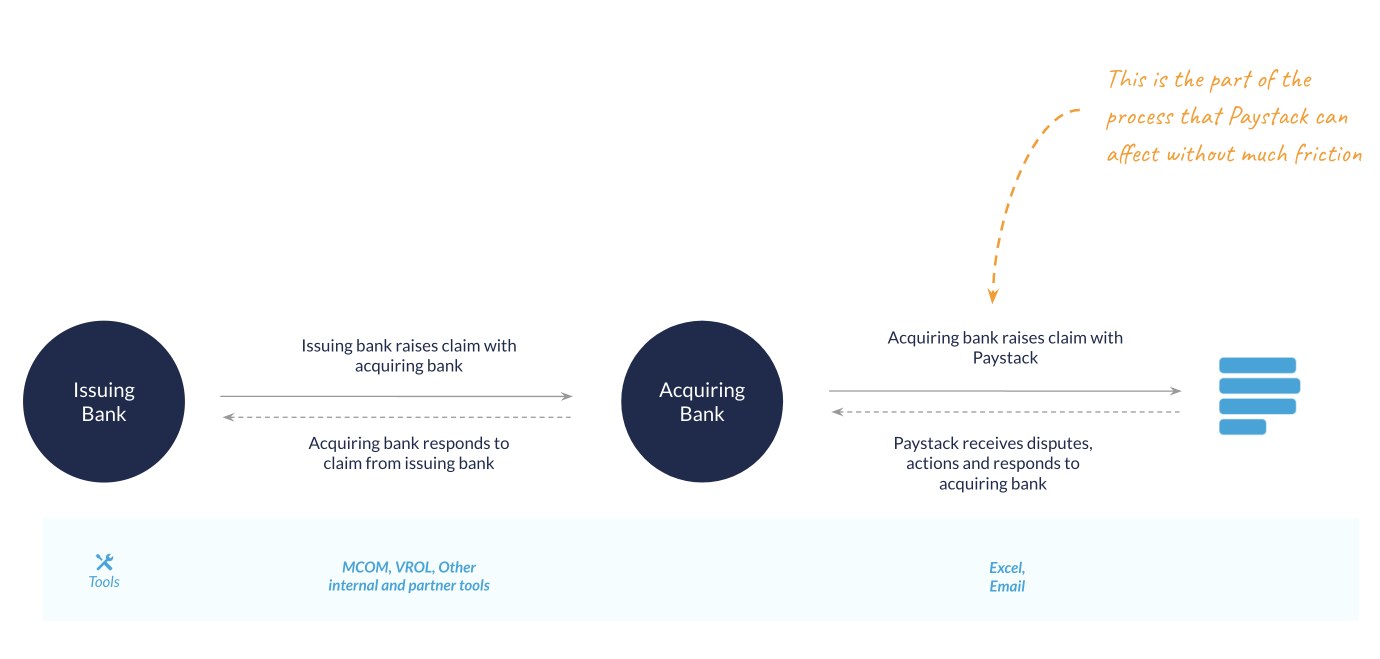
A chargeback starts with the cardholder’s issuing bank, which raises a claim with the acquiring bank through tools like MCOM and VROL. The acquiring bank then raises it with Paystack, mostly over Excel files and email. That last hand-off is the part Paystack can improve without much friction, so that is where we focused.

Diagram: the issuing bank raises a claim with the acquiring bank using MCOM, VROL and partner tools; the acquiring bank raises the claim with Paystack over Excel and email, which is the part Paystack can affect without much friction

01 · Research

Mapping the disputes journey, end to end

Process

Sitting with the team as they worked

I spent time chatting with and shadowing the operations team as they logged and answered real bulk files, noting every tool, hand-off and workaround. We then mapped the full journey on one board, from the moment a bank or card scheme raises a dispute to the moment a response goes back.

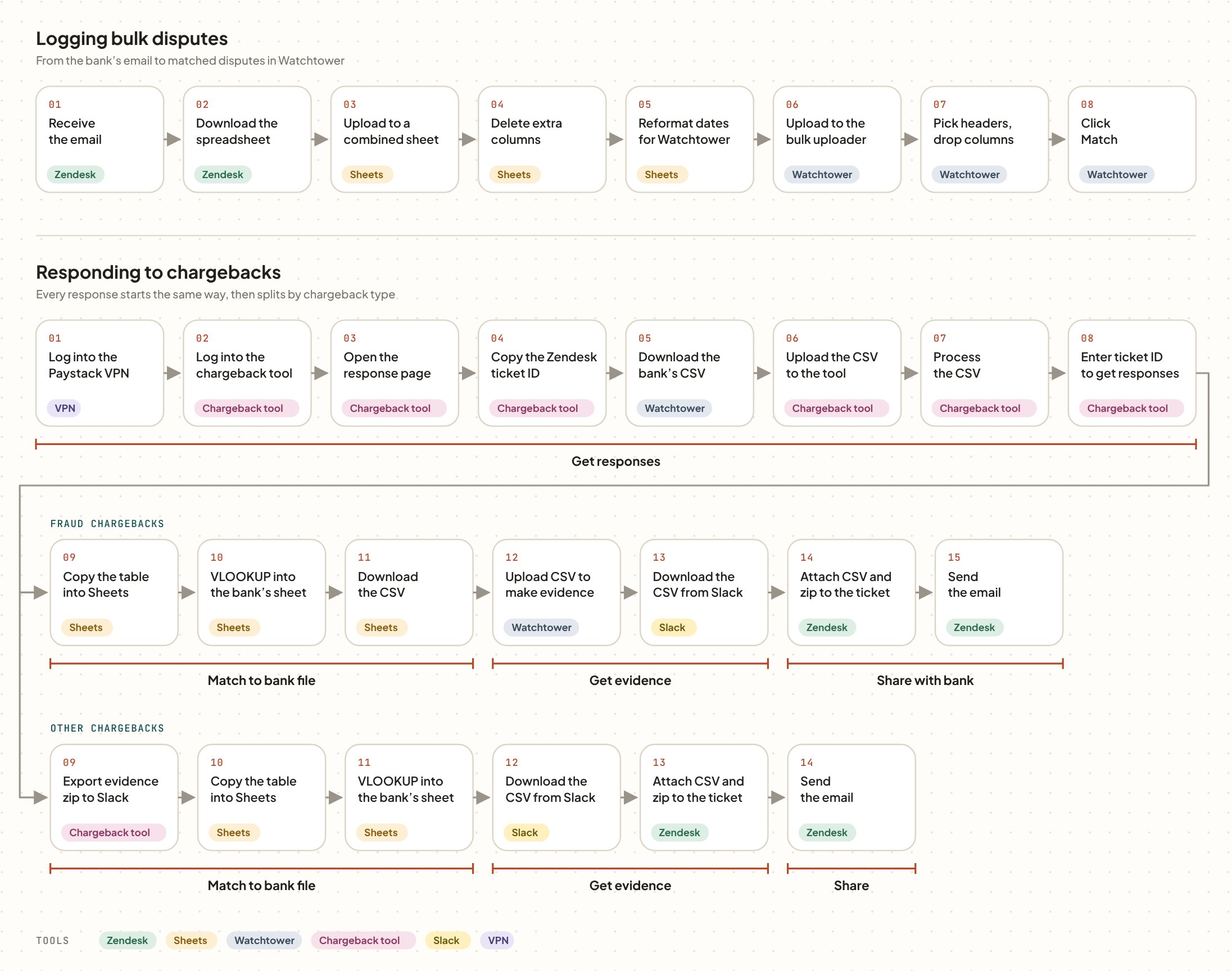
Today’s process step by step. Logging bulk disputes takes eight steps across Zendesk, Google Sheets and Watchtower. Responding starts with eight shared steps in the VPN, chargeback tool and Watchtower, then splits: fraud chargebacks take seven more steps and other chargebacks six, across Sheets, Watchtower, Slack and Zendesk.
Today’s process, with each step tagged by the tool it happens in.

The journey

Four routes a chargeback can take

Disputes move between Paystack, merchants, acquiring banks and issuing banks. We mapped each route step by step, with who is involved, the tools they use, and the challenges and open questions at each stage.

Route 01 · Accepted

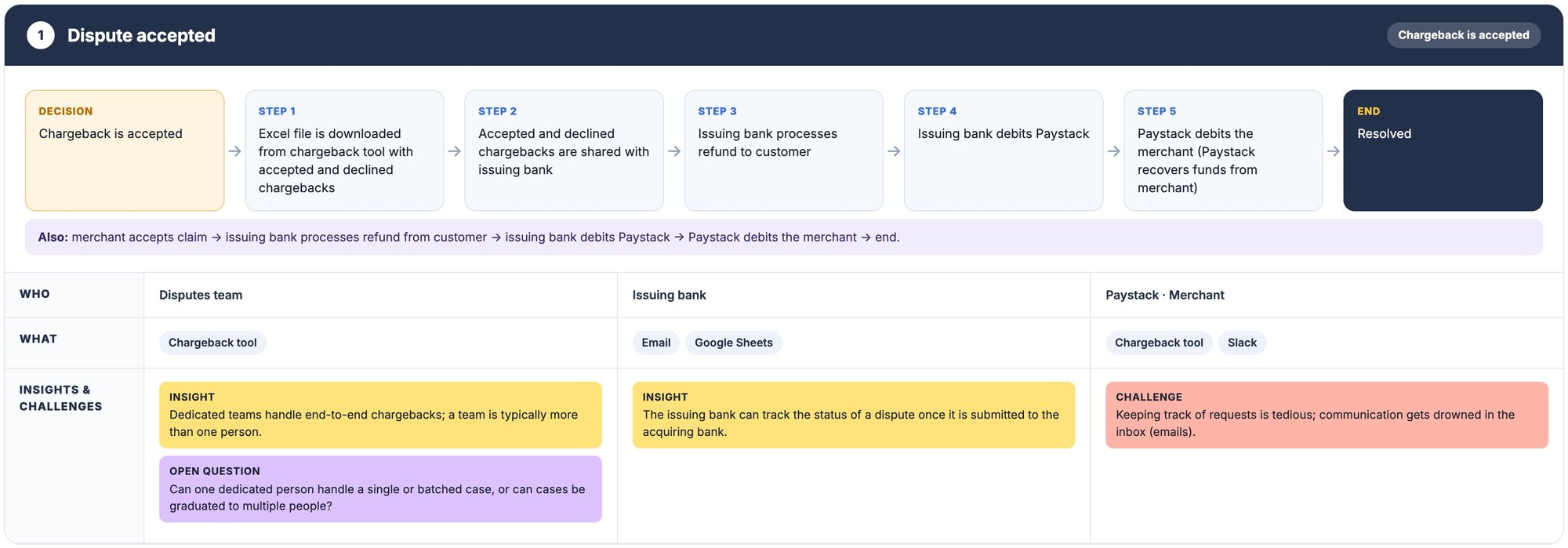
Dispute accepted

Disputes team · Issuing bank · Merchant

Keeping track of requests is tedious, and communication gets drowned in the inbox.

How it works

  • The chargeback is accepted and logged in the chargeback tool
  • An Excel file of accepted and declined chargebacks is shared with the issuing bank
  • The issuing bank refunds the customer and debits Paystack
  • Paystack debits the merchant to recover the funds

Challenges and open questions

  • Dedicated teams handle chargebacks end to end, usually more than one person
  • Can one person handle a batch, or should cases be graduated to others?
  • Requests are tracked over email, so they get lost
Journey map of an accepted dispute, with who is involved, the tools they use, and insights and challenges
Select to open the full map.

Route 02 · Declined

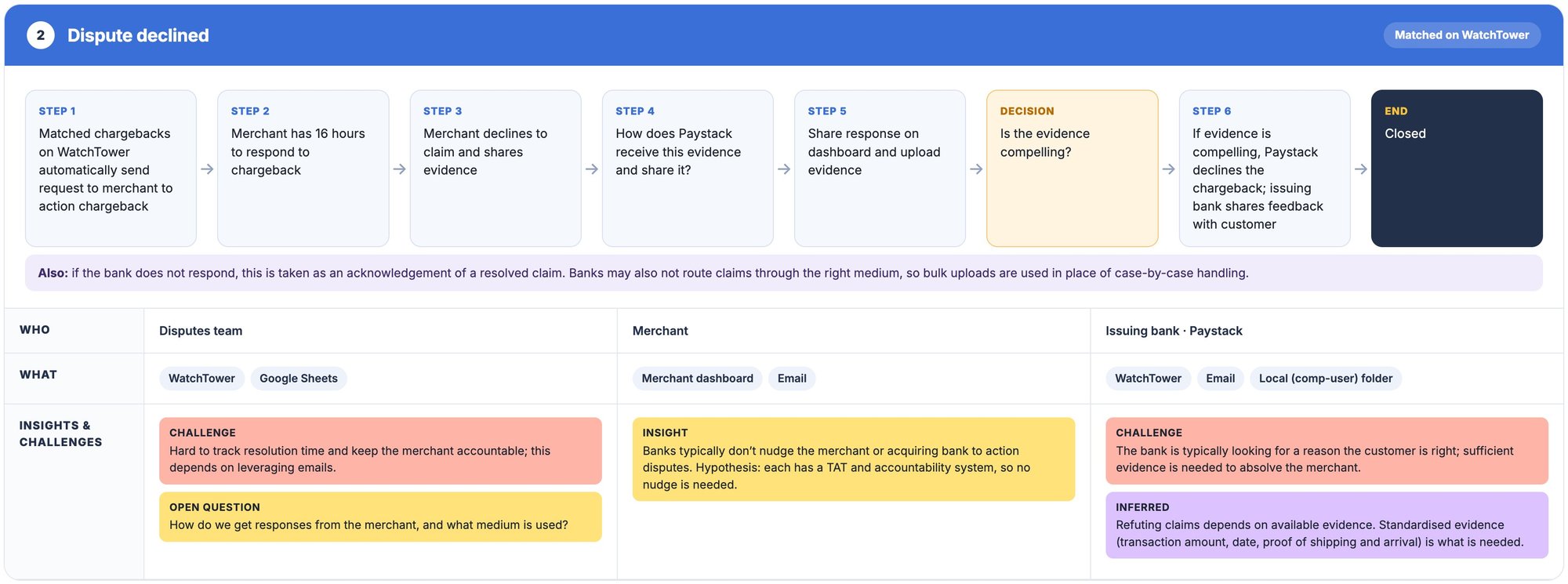
Dispute declined

Disputes team · Merchant · Issuing bank

The bank is typically looking for a reason the customer is right, so the evidence has to be compelling.

How it works

  • Watchtower matches the chargeback and asks the merchant to respond
  • The merchant has 16 hours to decline the claim and share evidence
  • The team uploads the evidence and shares the response with the bank
  • If the evidence holds up, the bank declines the chargeback and tells the customer

Challenges and open questions

  • Resolution time is hard to track, and keeping merchants accountable depends on email
  • How should merchant responses reach us, and through which channel?
  • Banks don’t nudge merchants; each has its own turnaround times
  • Standard evidence such as amount, date and proof of delivery is what wins
Journey map of a declined dispute, with who is involved, the tools they use, and insights and challenges
Select to open the full map.

Route 03 · Pre-arbitration

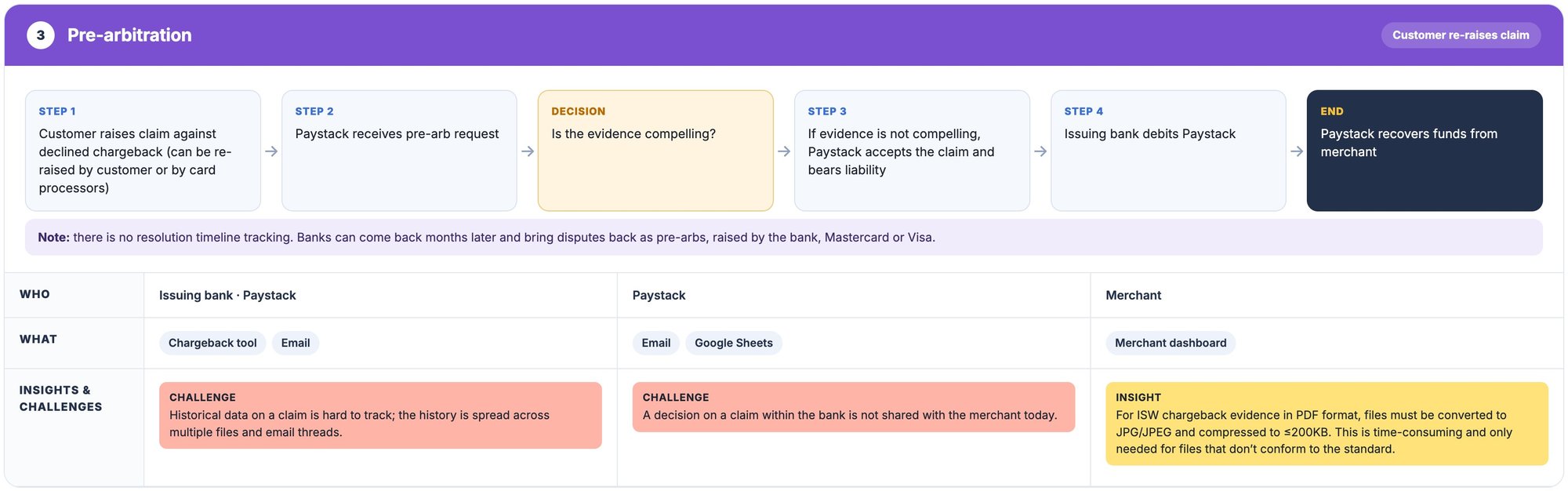
Pre-arbitration

Issuing bank · Paystack · Merchant

There’s no resolution timeline, so banks can come back months later with a pre-arbitration claim.

How it works

  • The customer, bank or card scheme re-raises a declined chargeback
  • Paystack receives the pre-arbitration request
  • If the evidence isn’t compelling, Paystack accepts the claim and bears liability
  • The issuing bank debits Paystack, and Paystack recovers funds from the merchant

Challenges and open questions

  • A claim’s history is spread across files and email threads
  • The bank’s decision isn’t shared with the merchant
  • Some bank evidence must be converted from PDF to JPG under 200KB by hand
Journey map of pre-arbitration, with who is involved, the tools they use, and insights and challenges
Select to open the full map.

Route 04 · Fraud

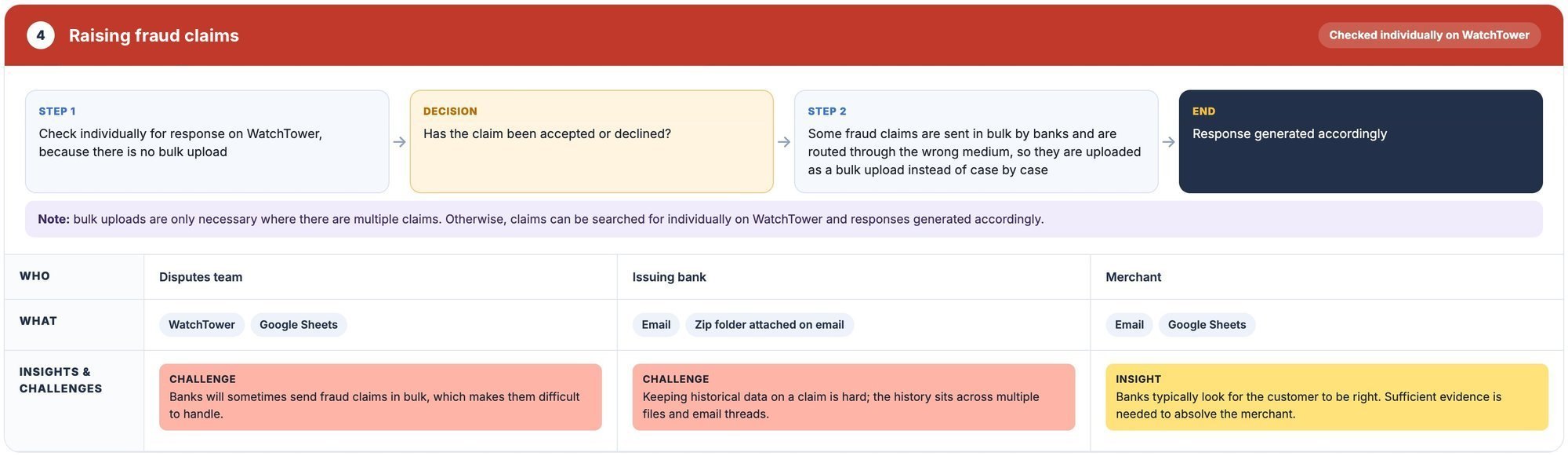
Raising fraud claims

Disputes team · Issuing bank · Merchant

Banks sometimes send fraud claims in bulk through the wrong channel, which makes them hard to handle.

How it works

  • Fraud claims are checked one by one on Watchtower, since there’s no bulk upload
  • The team decides whether each claim is accepted or declined
  • Bulk claims from banks are uploaded together instead of case by case
  • A response is generated for each claim

Challenges and open questions

  • Bulk fraud files arrive as zip folders attached to emails
  • A claim’s history is hard to piece together across files and threads
  • Merchants need enough evidence to show the customer isn’t right
Journey map of raising fraud claims, with who is involved, the tools they use, and insights and challenges
Select to open the full map.

02 · Insights

Where things went wrong

What we learned

Too many tools, too little visibility

Disputes arrive through many channels and pass through at least six tools before they are resolved.

Some banks email individual team members directly, so the rest of the team can’t see what has come in.

The same chargeback can be filed twice, once as regular and once as fraud.

Deciding who is liable depends on the experience of whoever picks it up, which puts money at risk.

A bulk fraud file takes about six hours to process and can’t be split between people.

Nothing tracks how long a dispute takes, so pre-arbitration claims can come back months later.

Deadlines

Merchants have just 16 hours to send their evidence before Paystack responds to the bank.

Formatting

Some banks only accept evidence as JPGs under 200KB, so PDFs had to be converted and compressed by hand.

Card schemes

Mastercard separates fraud chargebacks but Visa doesn’t, so the team sorts them by chargeback code.

Matching

Bank files rarely match Watchtower’s format, so columns are cleaned up in Sheets before every upload.

Framing the problem

From one big risk to problems we could design for

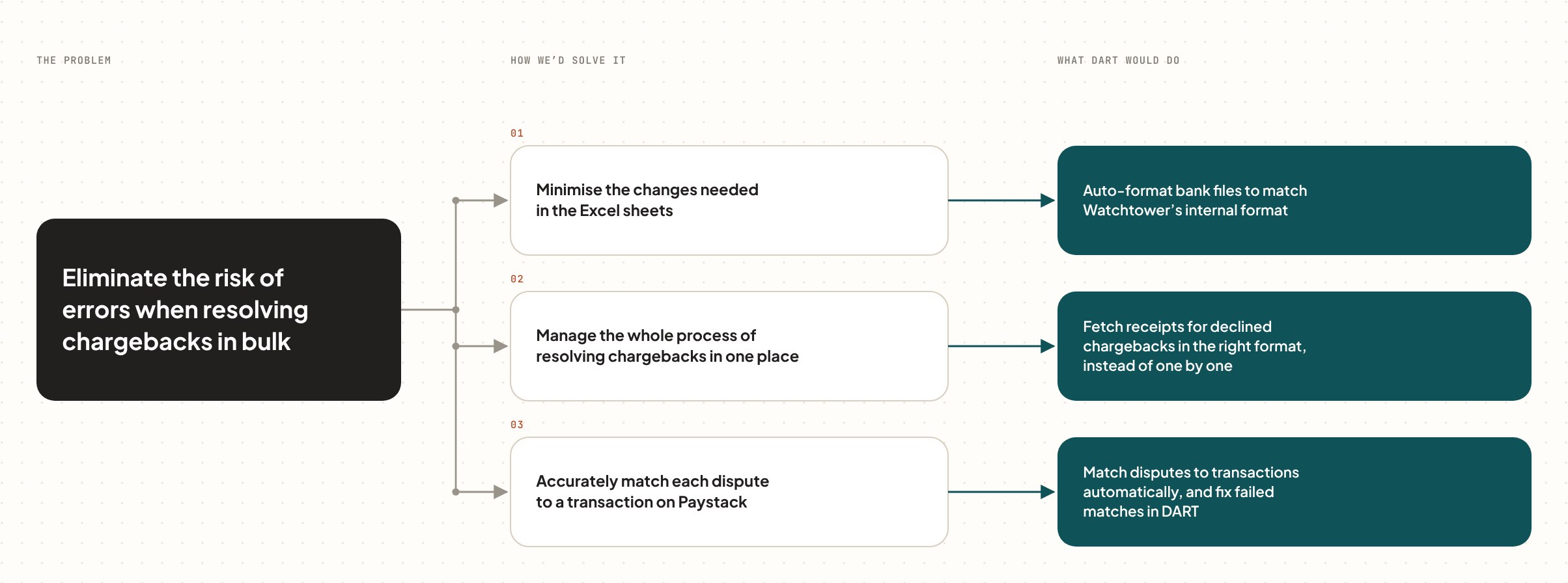
Problem tree: eliminate the risk of errors when resolving chargebacks in bulk. Three ways to solve it, each with what DART would do: minimise Excel changes by auto-formatting bank files for Watchtower; manage the whole process in one place by fetching receipts for declined chargebacks in the right format; and accurately match disputes to transactions automatically, fixing failed matches in DART.

What if the team could log, match, collect evidence and respond, all in one place?

The question we designed around

03 · Solution

DART, the Disputes Aggregation and Resolution Tool

Ideation

Three themes, one priority

In an ideation workshop with the disputes team, ideas clustered into three themes: automate formatting, automate evidence collection, and build one tool for the whole process. We prioritised the last, a central platform that would connect to Zendesk, the internal dashboard and partner disputes APIs, and resend pending disputes automatically.

The most impactful features were the ones that cut manual work by automating three things: matching claims to transactions, making dispute responses visible to the whole team, and generating and matching responses to declined disputes.

  1. Upload bulk disputes. DART formats the bank’s file for Watchtower and keeps the original.
  2. Match to transactions. Disputes are matched automatically, and failed matches are fixed in DART.
  3. Get responses. Merchant responses come in, can be edited, and are marked good to go.
  4. Generate and send. Evidence is converted to the bank’s format and sent through Zendesk, or downloaded to send by hand.

Flows

Logging disputes

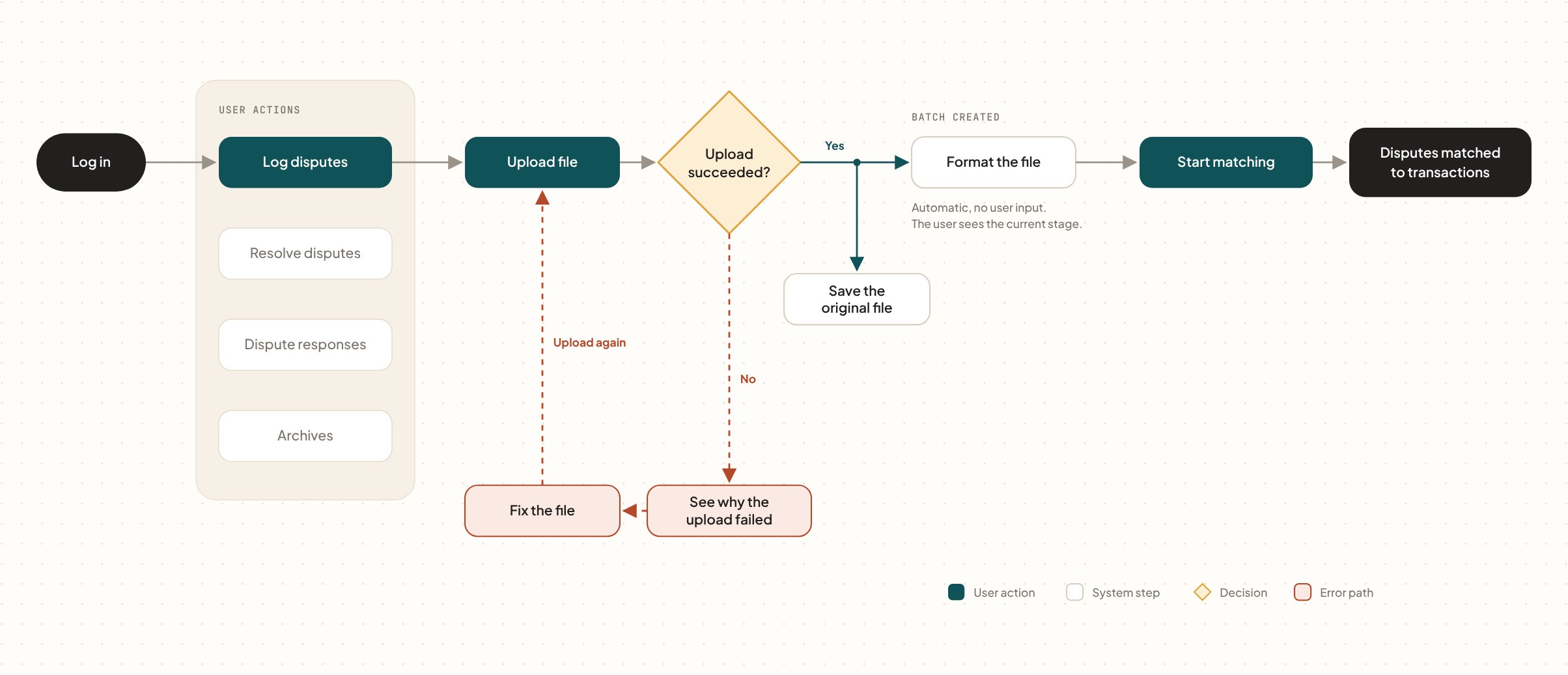
Uploading a bank file is one step. If it fails, DART explains why so the file can be fixed and uploaded again.

Flowchart: log in, choose Log disputes and upload a file. If the upload succeeds, the original file is saved, a batch is created and the file is formatted automatically, then the user starts matching disputes to transactions. If it fails, the user sees why, fixes the file and uploads again.

Sending responses

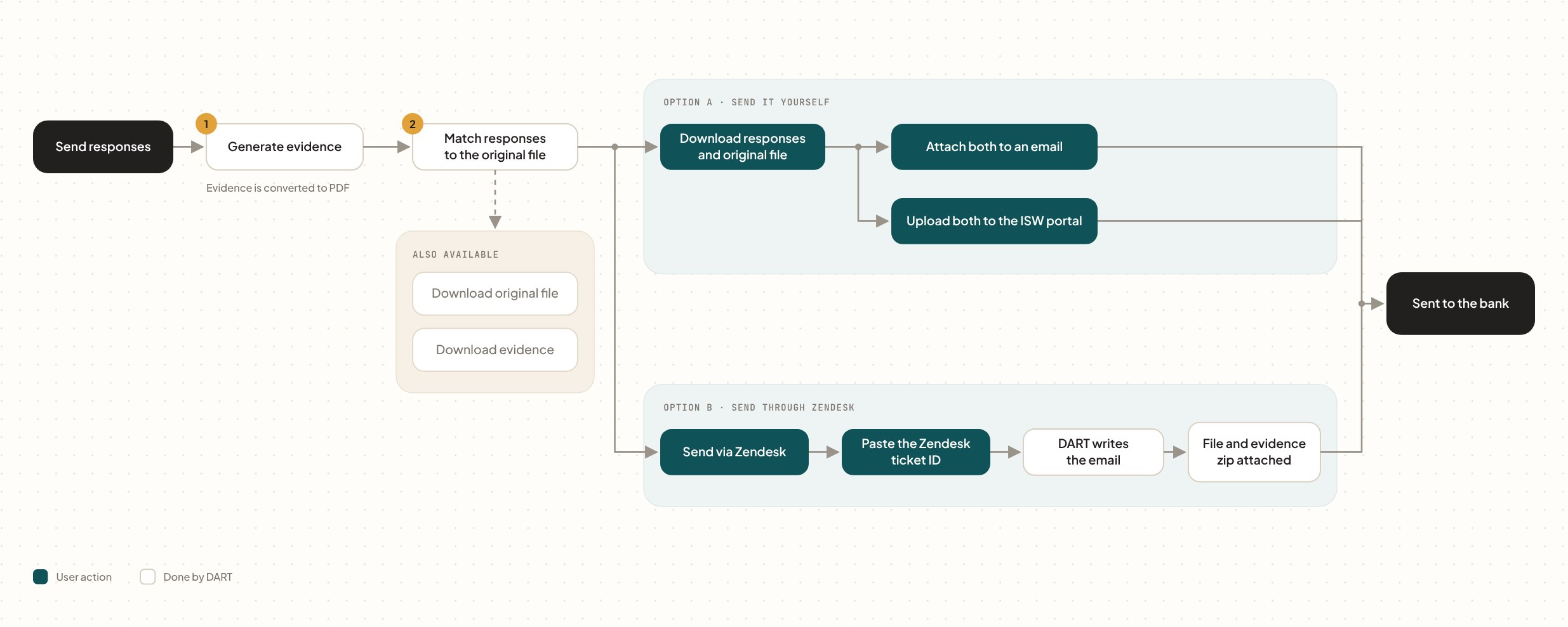
Evidence is generated, matched to the original file and sent to the bank, either through a Zendesk ticket or a bank’s own portal.

Flowchart: DART generates evidence as PDFs and matches responses to the original file, with optional downloads. The team then either downloads the files and emails them or uploads them to the ISW portal, or sends through Zendesk by pasting a ticket ID so DART writes the email with the file and evidence zip attached. Both paths end with the response sent to the bank.

Prototype

Respond to the bank in one click

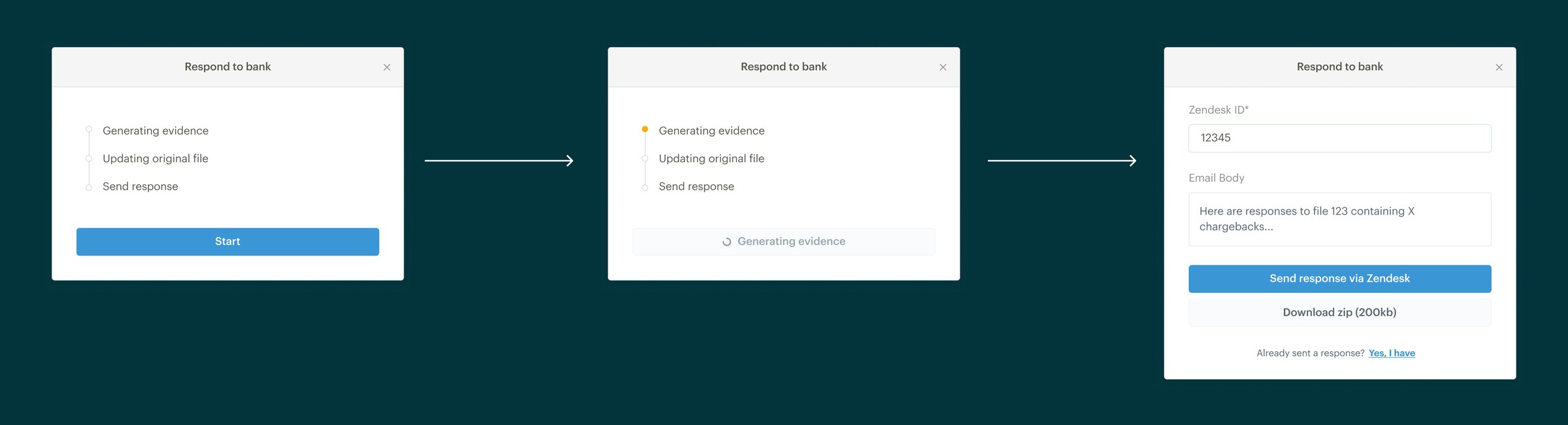
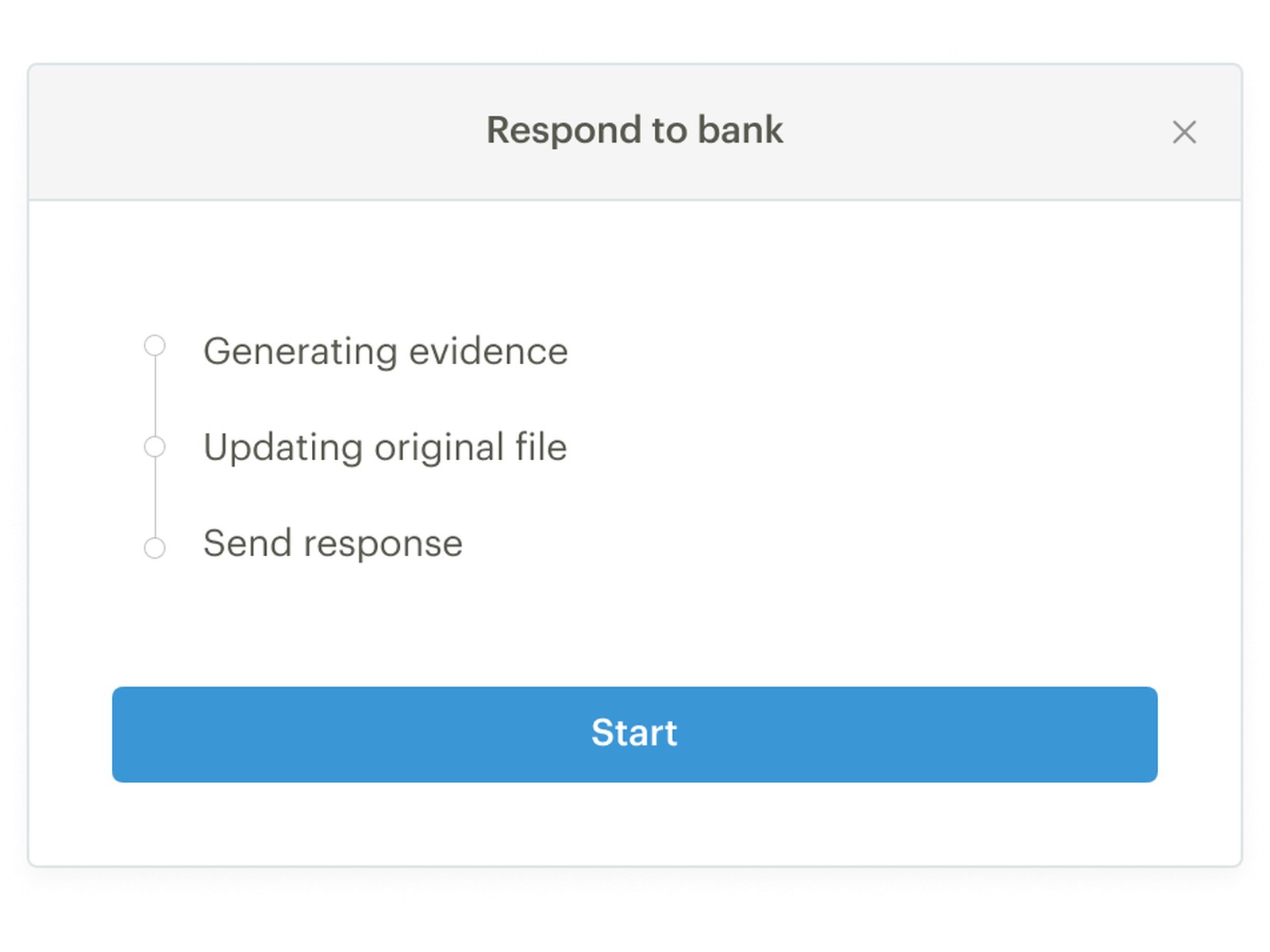
Each bulk file becomes a batch in DART, with every dispute’s status in one table. When the team is ready, Respond to bank generates the evidence, updates the bank’s original file and sends the response, with progress shown at each step.

Three steps of the Respond to bank dialog: start, generating evidence with progress, then entering a Zendesk ID and email body to send the response via Zendesk or download a zip
Generating responses: start, watch the evidence generate, then send through Zendesk or download the zip to send by hand.

04 · Outcome

Fully adopted by the disputes team

DART rolled out in phases through the first half of 2023, and by September the disputes team had moved onto it completely. Evidence is now formatted to each bank’s and card scheme’s rules, with PDFs merged and Paystack receipts pulled from Watchtower. Failed evidence generation can be retried, Interswitch fraud chargebacks are sorted with no manual work, and proof of authentication is shown alongside each dispute.

Success metrics we set

50%less time spent responding to bulk disputes
70%of chargebacks processed through DART
<$500lost per quarter to tooling downtime

Next project

Sendy Supply seller experience

Read next case study